
WCS Team App4.31.0 - Google Play
You'll be able to see results in few seconds.
Publisher Description
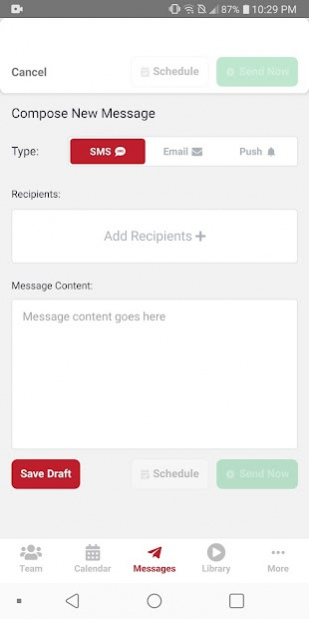
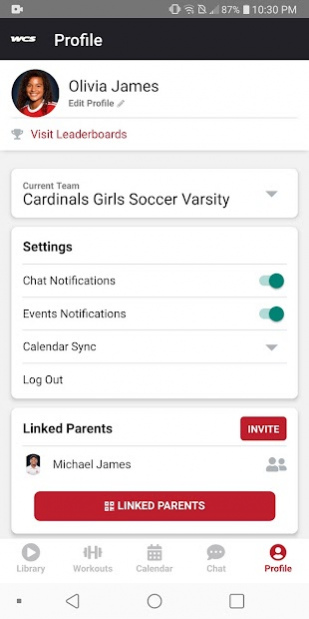


Log into your team's Williamson County Team account to complete workouts assigned to you by your coach, see how you stack up on the leaderboards, check out what your teammates are working on, and stay in the know with your director & team schedule.
Your coach must have a Williamson County Team account to use this app. If your coach does not have a Williamson County Team account, tell them connect with their director
About WCS Team App
The company that develops WCS Team App is MaxOne. The latest version released by its developer is 4.31.0.
To install WCS Team App on your Android device, just click the green Continue To App button above to start the installation process. The app is listed on our website since 2022-02-17 and was downloaded 0 times. We have already checked if the download link is safe, however for your own protection we recommend that you scan the downloaded app with your antivirus. Your antivirus may detect the WCS Team App as malware as malware if the download link to com.maxone.wcs is broken.
How to install WCS Team App on your Android device:
- Click on the Continue To App button on our website. This will redirect you to Google Play.
- Once the WCS Team App is shown in the Google Play listing of your Android device, you can start its download and installation. Tap on the Install button located below the search bar and to the right of the app icon.
- A pop-up window with the permissions required by WCS Team App will be shown. Click on Accept to continue the process.
- WCS Team App will be downloaded onto your device, displaying a progress. Once the download completes, the installation will start and you'll get a notification after the installation is finished.
Program Details
System requirements
Download information
Pricing
Version History
version 4.31.0
posted on 2022-02-17
Minor bug fixes
version 4.9.0
posted on 2021-02-16
New Features:
- Activity Goals
- Workout Questions
Bugs resolved:
- Resolved issue with inaccurate badge notification number.
- Resolved issue with the SMS verification during account sign-up.
- Resolved issue with links in push notifications.
version 4.8.0
posted on 2021-02-02
New Features in v4.8.0:
- Ability to add new activities.
- Ability to edit current activities.
Issues Resolved in v4.8.0:
- Resolved an activities tagging issue that caused discrepancies between web and mobile.
- Resolved issues where activities that did not contain any media content were not being displayed on the mobile training library.
- Resolved issue with Calendar Sync.
- Resolved issues where certain workouts caused the app to crash.
version 4.5.1
posted on 2020-12-02
Release Notes for v4.5.1:
- Issue regarding video playback has been resolved.
- Issue regarding user profile and Performance Leaderboards loading resolved.
version 4.4.0
posted on 2020-11-13
v4.4.0 Release Notes
- Resolved sign in issue with text field being covered by keyboard.
- Resolved issue around switching teams.
- Resolved issue around displaying team names
- Resolved leaderboard sorting issue
- Resolved issue with editing parent info
- Resolved issue in workouts around the wrong measure displaying at certain times.
- Added "Powered by MaxOne" to the sign in page.
version 4.3.0
posted on 2020-11-03
v4.3.0 Release Notes
- Enhanced sign up experience.
- Resolved an issue when editing email, phone number and name.
- Resolved an issue when notification from a workout is expected.
- Improvement to UX/UI when editing a group name.
- Resolved an issue happening with international phone numbers.
version 1.1.11
posted on 2020-07-13
Fixes a bug inside of workouts.
version 1.1.9
posted on 2020-05-31
Various feature enhancements & bug fixes
version 1.1.8
posted on 2020-04-28
Bug fixes & feature enhancements
version 1.1.7
posted on 2020-03-16
Feature enhancements & bug fixes
Disclaimer
Official Google Play Link
We do not host WCS Team App on our servers. We did not scan it for viruses, adware, spyware or other type of malware. This app is hosted by Google and passed their terms and conditions to be listed there. We recommend caution when installing it.
The Google Play link for WCS Team App is provided to you by apps112.com without any warranties, representations or guarantees of any kind, so access it at your own risk.
If you have questions regarding this particular app contact the publisher directly. For questions about the functionalities of apps112.com contact us.
